Time Mosaic

A Life Documented keep what happened and remember what it meant

a journal that keeps time

Start Capturing

Free Trial. No Credit Card Required

Image needed The hero picture. The one thing a stranger sees first.

The journal

Capture the moments and narrate the story

  • A journal entry as it happened, bound by time or just a note
  • Keep the record and the meaning you give it separate
  • Amendable with photos and tags
  • Optional annotations include location, gratitude, and rating
  • End-to-End Encryption - your journal is completely private
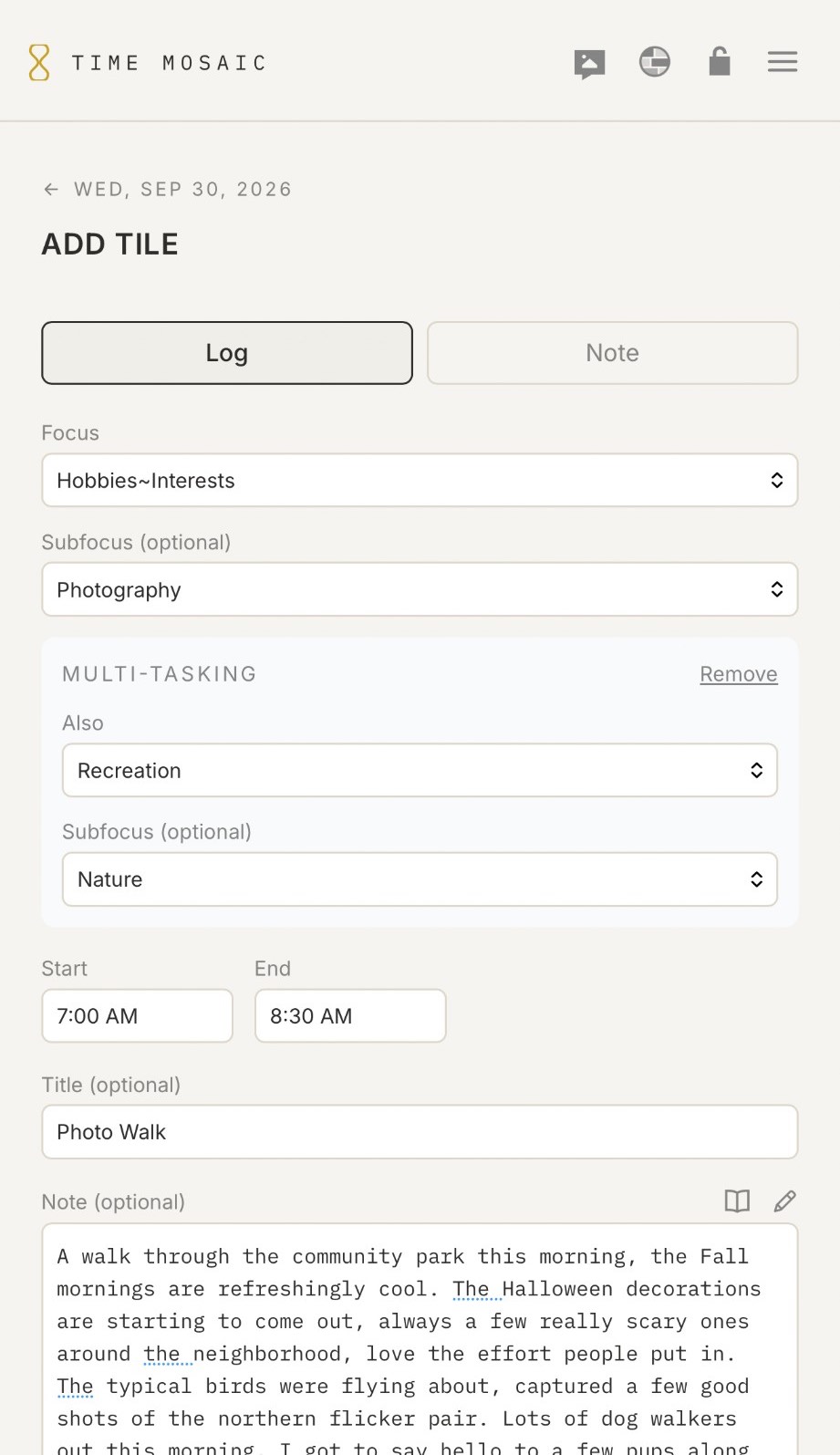
Adding an entry in Time Mosaic on a phone: a Photo Walk from 7:00 to 8:30 AM under Hobbies and Interests and Photography, multitasked with Recreation and Nature, with a note about a cool fall morning in the park.

Time Spent

Spend time on what matters

  • Organize entries by what you value
  • Multitask entries when time holds two things
  • Reflect on where your time went, review a range and log what the time meant
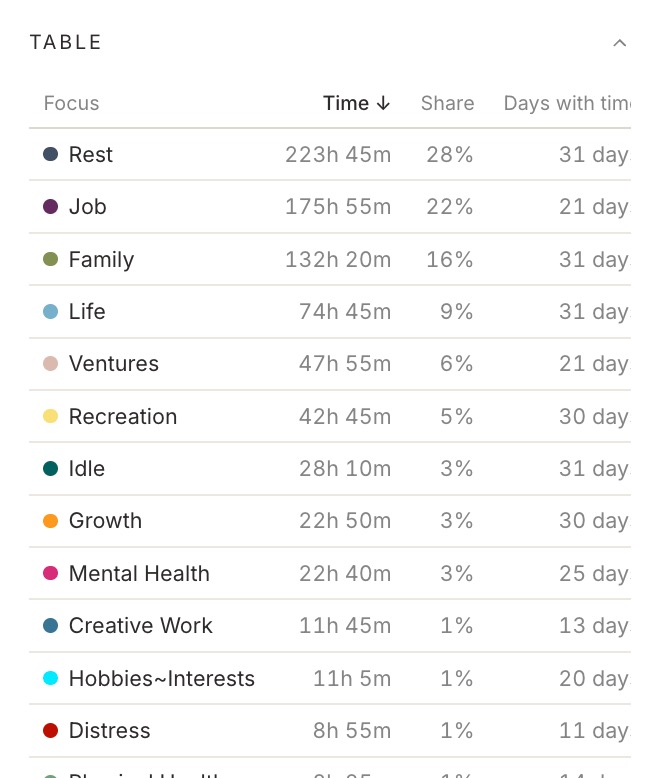
The hours spent on each focus over a month in Time Mosaic, as a table on a phone: Rest, Job, Family and the rest, each with its time, its share and the days it appeared.

The Mosaic

A work of art from the days you keep

  • At-a-glance visual of where your time was spent
  • Share your Time Mosaic with your social feeds
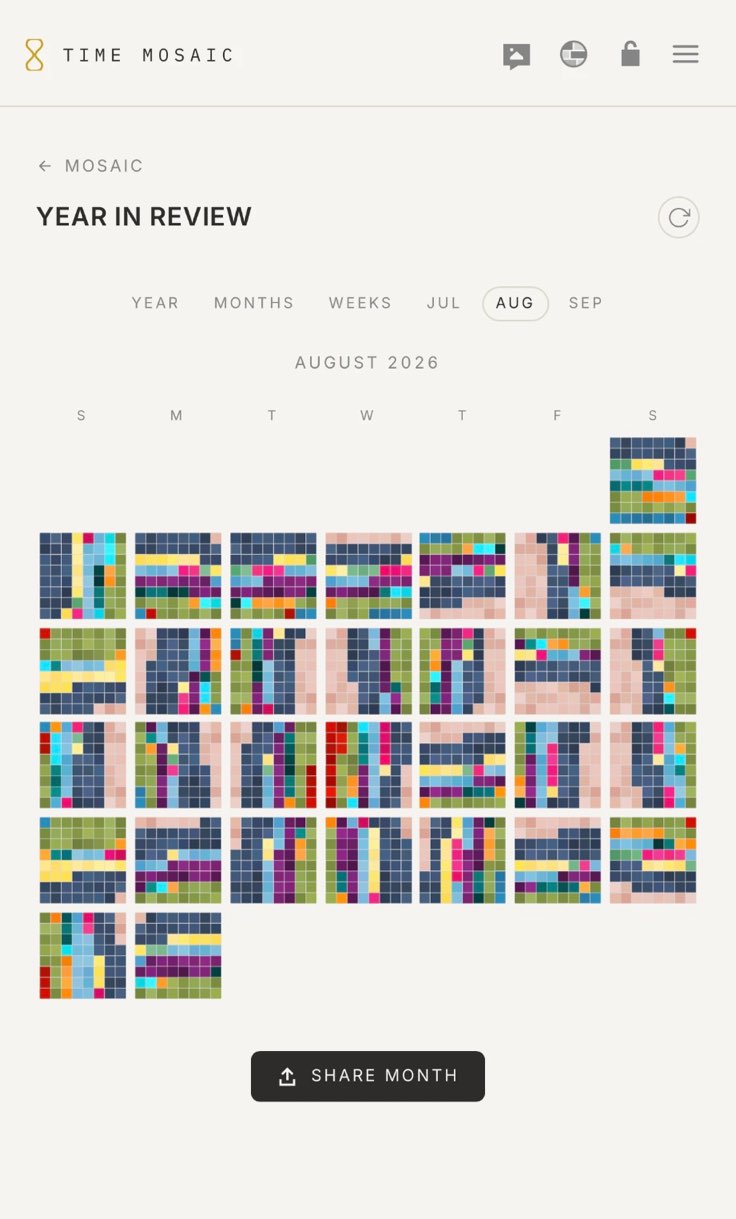
  • View your Time Mosaic each day or as a range of time
  • Customizable view - round with mosaic tiles or a modern square grid
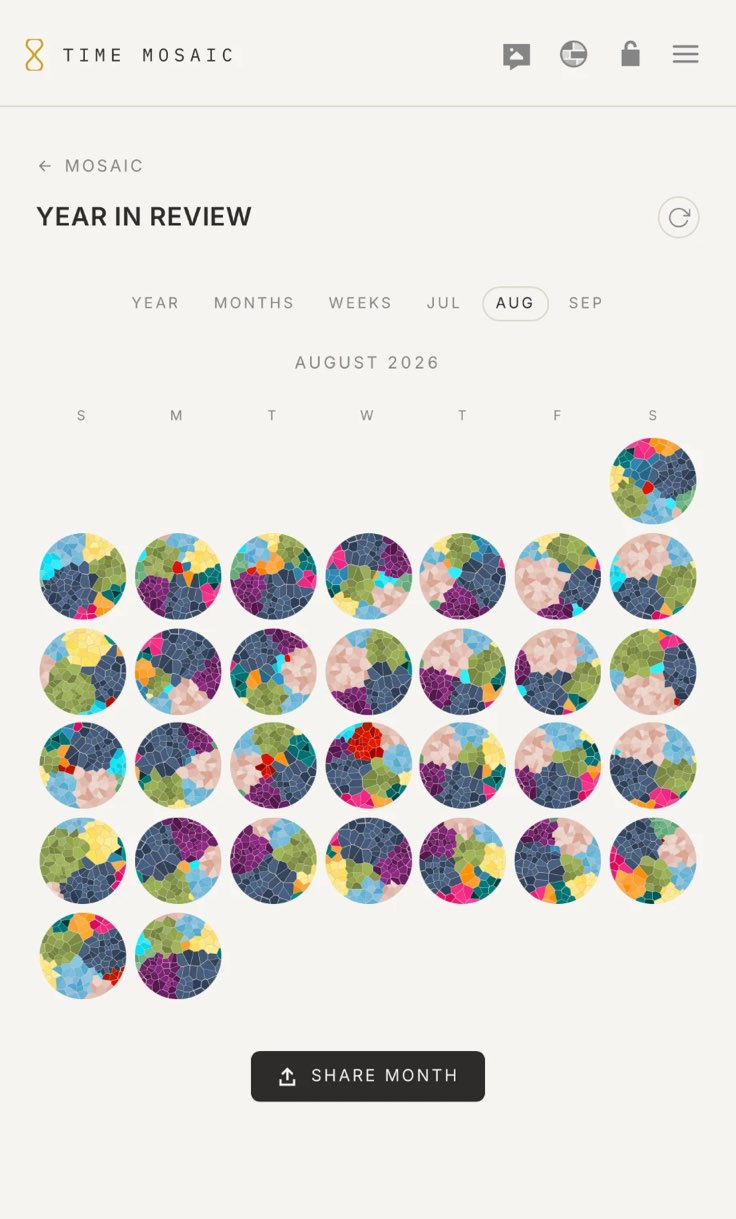
A month in Time Mosaic on a phone: August 2026 as a calendar, each day a round mosaic of cut stones, fading to the same days as square grids and back.

Optional Add-Ons

Something for everyone

  • Keep your experience minimal and use only what you need
  • They are all optional - switch them on and off at your whim, nothing gets lost
  • All Add-Ons are available with your subscription - no extra cost
  • For productivity, for tracking, for journaling, for cataloging, explore them all

For Productivity

For Recording

For Journaling

For Tracking

For Cataloging

For Sharing

Sharing

Share the moments you choose

  • Share photo entries with a private link or in a public feed
  • Your journal stays encrypted, you write the public title and caption to share
  • Comments are optional, and can be moderated
  • Create a Community, invite members and share a timeline feed
  • Sharing is an optional Add-On - nothing gets shared with it off
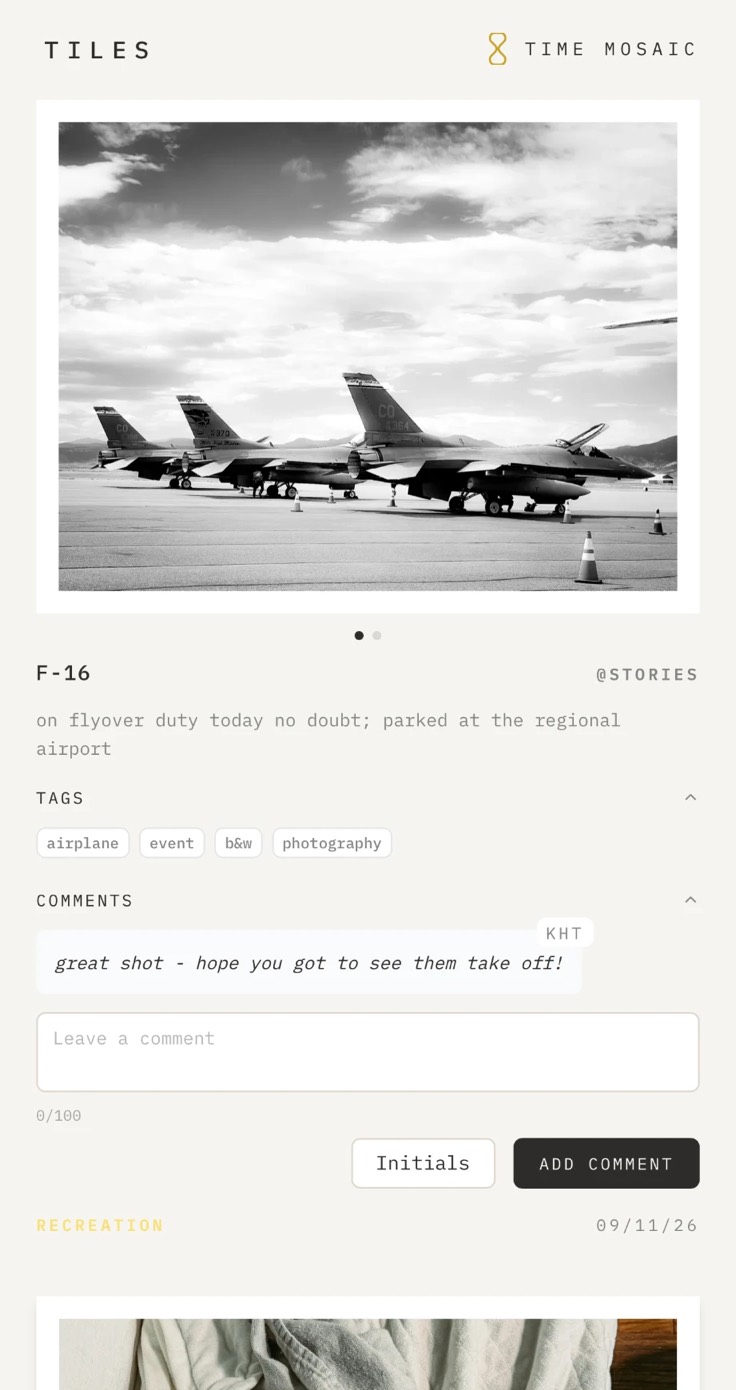
A shared entry in Time Mosaic's public feed on a phone: a black and white photo of F-16s parked at a regional airport, with its public title and caption, its tags, and a comment from a reader.

Features

Every piece considered

  • Lock those extra private entries, protected by a passcode
  • Customizable appearance settings, including color themes
  • Search entries by dates, tags, focus and more
  • Bookmark notable entries and search to review them at any point
  • Mark those wonderful days as a Favorite and return to them again and again
  • Markdown supported for enhanced journal text
  • Quick Lock Security - secure the app instantly
  • A full-page writing surface for tablet and pencil - your handwriting becomes text

Optional Add-Ons

For Productivity

For Productivity

Tasks

Create tasks to manage your to-dos. Add them to an entry while you work on them, and keep track of how long each one takes. Plan them for certain days, too. Your timeline shows what is due and what is upcoming.

For Productivity

Reminders

Add a note at any point, with or without a task, and set a reminder date on it. You receive a notification on your timeline when the reminder arrives.

For Productivity

Focus Mode

A distraction-free window for the block of time you're in. Watch your time remaining, and add more if you need it. An optional setting, Track Distractions, lets you log distractions and notice what interrupts your focus the most. Add a distraction as a note, and return to it later for further clarification.

For Recording

For Recording

Photos

Add up to six pictures to an entry, encrypted on your device before they are uploaded.

For Recording

Tags

Add tag labels to your entries to group ideas, moments and activities together. Search by tag to see all your entries related to that tag.

For Recording

Location

Note where an entry happened, a place you type or simply Home. Set your home once and nearby entries mark themselves.

For Journaling

For Journaling

Journal Mode

Room for creative writing, for turning a moment into a story or answering a prompt. Keep the facts of the day apart from what they meant to you.

For Journaling

Gratitude

Note what you are grateful for on an entry and what kind of joy it brings. Manage the types of joy, and keep track of what you have to be thankful for.

For Journaling

Cup Meter

Pay attention to what fills your cup and what empties it. Rate each entry Full, Half or Empty, or give a focus a default so its entries start out rated.

For Tracking

For Tracking

Book Library

A library of books, track your reading and clip excerpts. See your stats and add ratings and summaries.

For Tracking

Movies & Series

A shelf of what you're watching, waiting to watch and have watched. Name a movie or series on an entry and the hours count themselves.

For Cataloging

For Cataloging

Commonplace

A catalog of quotes, excerpts, articles and recipes worth keeping, each clipped on the entry where you found it.

For Cataloging

Notebooks

Collect entries in a notebook: a project, a course, a question you keep coming back to. Read through your entries like a notebook, and highlight and bookmark them. You can also add files, web links and Commonplace notes.

For Cataloging

Linked Entries

Link entries to one another to keep related moments and ideas together.

For Cataloging

Files

Files of any kind, up to ten on an entry, encrypted on your device before they are uploaded. They can be tied to an entry directly, or placed in your Commonplace clippings for easy access.

For Cataloging

Web Links

Websites, up to twenty on an entry, each with a name of your own if you want one. They can be tied to an entry directly, or placed in your Commonplace clippings for easy access.

For Sharing

For Sharing

Personal Feed

Your feed is meant to be intimate and personal. Share it with just the people you choose, or make it public. Either way, it is moderated and maintained by you.

For Sharing

Community Feed

A timeline feed shared between members. Create a group, invite your friends, and the entries you each share come together in one timeline that only the group can see.

Where it lives

Open a browser, that is all

  • It lives on the web, with nothing to install
  • Use it on any device, from any browser - your data moves with you
  • Add it to your home screen and it loads like a mobile app
Time Mosaic's icon on a phone's home screen, in a row of apps above the dock.

End-to-end encrypted

Locked with a key only you have

In your journal

Coffee on the porch before anyone else was up, and the first frost on the garden beds.

On our server

  • Your words, names, photos, and locations are sealed with a key made from a passphrase you create, which is never sent anywhere
  • Sign in from anywhere and your passphrase opens your record - the passphrase itself is stored nowhere
  • There is no locksmith: no one can unlock your data but you
  • No AI, no models - nothing is reading what you wrote, this is a space for only you

About end-to-end encryption

Your passphrase never leaves

It is not sent anywhere, and it is not stored anywhere, not on the server, not in the browser. What it does is derive a key: run through PBKDF2-SHA256, 600,000 iterations, with a salt belonging to your account alone, producing a 256-bit key. That derivation happens on the device every time you unlock.

A wrong passphrase is caught here

Your account keeps a canary: a small piece of ciphertext only the right key can open. Unlocking opens it on the device. So the check needs no password on the server to compare against; there is nothing there to steal, and the passphrase is never transmitted to be verified.

What is sealed

Entry titles and notes, journals, photos, tag and task names, location and any amounts. Each is encrypted with AES-256-GCM on the device before it is sent, so what crosses the network and what sits in the database is ciphertext the server has no key for.

What is not

No sensitive or private text ever crosses the network unencrypted. What does travel in the clear is the shape of the record: dates, times and durations, which focus an hour belongs to, colors and order. Shape, never the words you wrote in an entry. It is deliberate: assembling a day from it is what lets the app work without any server ever holding a key.

One exception exists and it is yours to make. Sharing an entry sends the separate public text you wrote for it, never your own title or journal, and any photos on it, which go out as pictures anyone with the link can see.

Where the key lives

Your browser holds it, in a way that nothing can read back, not the app, and not someone poking around inside the browser. The app can ask the browser to unlock your writing while you are signed in, but it never sees the key itself. There is nothing to copy, and nothing to send anywhere.

It is never uploaded. Lock or Sign Out destroys it, and the next visit builds it again from the passphrase you type.

What no one can do

Reset it, recover it, or read around it: not the operator, not support, not us, and not anyone who obtained the database. There is no second key and no override. That is the same property that makes a forgotten passphrase final: the writing stays unreadable.

And we will never ask you for it, not by email, not in support, and nowhere in the app but the screen that unlocks it. Anything that asks you for your passphrase somewhere else is not us.

Community & Support

Ask, suggest, or just say hello

  • Members get access to the Discord community discussion board
  • New Add-Ons are considered with enough interest, so ideas are welcome
  • Email the Founder directly for questions, suggestions and support

About Time Mosaic

Time Mosaic is a documentary tracker, a journal of your life as it unfolds. This is a space for you to record thoughts, store photos and memories of your time spent. This app encourages you to slow down and pause, stay present with the moment at hand, reflect on the time gone by and prepare for the time ahead.

What is documentary tracking?

Tracking that focuses on documenting activities and moments instead of changing them, intended for long-term self-expression, reflection and remembering, rather than simply to monitor, regulate and motivate a data-driven life. After Epstein et al., UbiComp 2015 · Elsden, Designing Documentary Informatics, DIS 2017

It is made for documenting a life, not for squeezing more out of the day, so you won't find calendar syncing or AI assistants. Optional Add-Ons can help with tasks and reminders, organize notes and files, track your reading and clip an excerpt, or keep a commonplace of links and quotes - all the little extras that accompany your time and space. But its purpose is to help you pay attention to the time you spend on what matters, and to record what that time means to you.

See how our Founder spends their days and view the live exhibit at timemosaic.art.

Start Capturing

Free Trial. No Credit Card Required